
Manual Orientation
Single Image Orientation and Calibration
If an image cannot be oriented automatically, this function can be used to attempt to orient the image. Typical applications include: historical images with many altered details or very few details remaining unchanged on the object, images with very poor image quality such as surveillance images, etc.
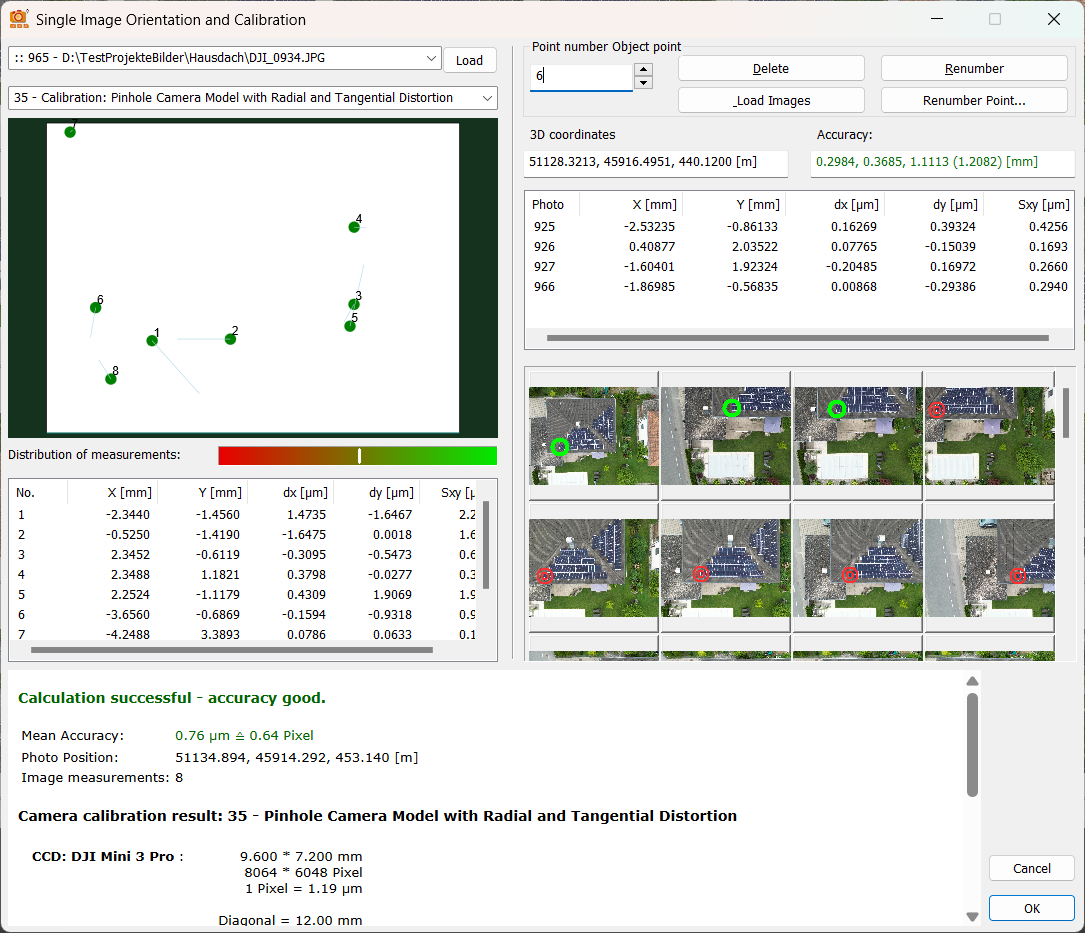
The operation is very similar to additional measurement: you measure an object point in 3-4 oriented images at the same time and measure the same point in the image that is to be oriented. Once at least 5 points have been measured, distributed as evenly as possible, ELCOVISION 10 attempts to orient the image and, optionally, calibrate the camera.
Recommended Procedure for Single Image Orientation
- Start single image orientation.
- If there are not oriented images in the project, the first of these images is automatically selected in the image selection box.
- In the camera selection box below, either select a camera that has already been calibrated or select one of the mathematical camera models to calibrate the image.
- Load 3–5 already oriented images in which points are visible that also appear in the image to be oriented.
- Measure a common point in 3–4 of the oriented images. Pay particular attention to high point accuracy – the points should be measured as precisely as possible.
- Then measure the same point in the non-oriented image.
- Repeat steps 5–6 until at least five points have been measured.
ELCOVISION 10 will now attempt to orient the image and calibrate the camera if necessary. If you measure 8 or more points, the orientation is usually already very good.
Ensure that the points in the image to be oriented are distributed as evenly as possible. The ‘Distribution of measurements’ indicator should be in the green range.
Notes on Camera Calibration
- First, select a camera model with as few parameters as possible from the camera selection box to ensure stable orientation.
- It is possible to try out different camera models at any time to compare the quality of the calculated orientation.
- Only if the image to be oriented has very strong distortions should one of the fisheye camera models be considered.
After successful single-image orientation, a global orientation should be calculated to balance the entire image array again so that maximum accuracy can be achieved.